
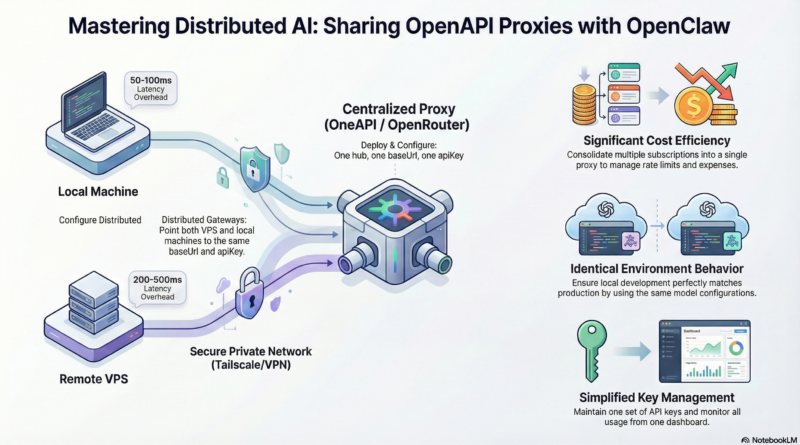
Sharing OneAPI Proxy LLM Across Multiple OpenClaw Gateways
Performance Considerations
Latency
The shared proxy adds an extra hop, which introduces some latency. Expect:
- Local proxy (same machine): ~50-100ms overhead
- VPS proxy across internet: ~200-500ms additional latency
For real-time applications, you might want:
- A local model for low-latency tasks
- Remote proxy for complex reasoning tasks where speed matters less
Connection Pooling
OpenClaw and your OneAPI proxy both benefit from connection pooling. Configure appropriate timeouts and keep-alive settings to avoid creating new connections for every request.
In OpenClaw config:
openapi:
  keepAlive: true
  maxConnections: 10
In OneAPI, tune the underlying HTTP client settings similarly.
Concurrent Requests
Both OpenClaw and the proxy handle multiple concurrent requests. Ensure your VPS has sufficient resources (CPU, memory, and notably network bandwidth) to handle the combined load from all gateways.
Monitor with htop or docker stats and scale up if needed.
Management and Monitoring
Track Gateway Usage
Your proxy should log which gateway made each request. In OneAPI, you can add custom headers to distinguish sources:
# In OpenClaw config (add custom header):
openapi:
  headers:
    X-Gateway-Id: "vps-gateway"  # or "macbook-local"
Then in OneAPI’s token request logs, you’ll see which gateway made which calls.
Set Up Alerts
Configure alerts for:
- Unusual spikes in usage (potential issues or abuse)
- Failed API calls exceeding threshold
- Proxy service downtime
Most proxies can send webhooks on events, which you can connect to Slack, email, or OpenClaw itself.
Periodic Token Rotation
For security, rotate the shared API token periodically. Create a new token, update all gateways, then revoke the old one. This limits exposure if a token is compromised.
Software-Specific Tips for OpenClaw
Auto-reconnect on Proxy Downtime
If the proxy goes down, OpenClaw should attempt to reconnect. The default behavior usually includes exponential backoff, but you can tune:
llm:
  openapi:
    retryAttempts: 3
    retryDelayMs: 1000
Model Fallback
Configure OpenClaw to try alternative models if the primary one fails:
llm:
  openapi:
    model: "gpt-4"
    fallbackModels:
      - "gpt-4o"
      - "claude-3-opus"
This requires your proxy to support multiple providers and models.
Session Persistence
OpenClaw’s session functionality (chat history, context) is stored locally on each gateway. Sharing a proxy doesn’t affect this—all conversation data remains on each machine. If you want to sync sessions between gateways, you’d need additional infrastructure (a shared database or message bus), but that’s beyond the scope of proxy sharing.
Common Pitfalls and How to Avoid Them
Pitfall 1: Different Model Names
OpenClaw configurations on different gateways might specify different model names. Double-check that both configs use the exact same model name string that the proxy expects.
Fix: Copy the model name from your proxy’s model list (in OneAPI admin panel) exactly.
Pitfall 2: Proxy CORS Issues
If you’re using a web-based OpenClaw frontend that talks directly to the proxy, CORS can block requests. The proxy should be configured to allow your frontend’s origin.
Fix: In OneAPI, set CORS origins in config or use Nginx to add CORS headers.
Pitfall 3: Timezone Differences
Logging and usage metrics might be off if your VPS and MacBook have different timezones. Use UTC everywhere or ensure consistent timezone settings.
Fix: Set TZ=UTC on all machines or explicitly configure timezone in your proxy and gateway configs.
Pitfall 4: Silent Failures
If the proxy is unreachable, OpenClaw might fail silently or produce default responses. Always check logs when things behave oddly.
Fix: Monitor OpenClaw and proxy logs with tools like journalctl, docker logs, or centralized logging. Set up alerts for repeated errors.
Extending the Pattern to More Gateways
This architecture scales. You can add more OpenClaw gateways (another VPS, a Raspberry Pi, a CI/CD runner) and have them all share the same proxy. Just:
- Install OpenClaw on the new machine
- Copy the same `baseUrl` and `apiKey` config
- Ensure network access to the proxy
- Optionally add unique `X-Gateway-Id` headers
The proxy becomes your central AI infrastructure hub.
Conclusion
Sharing a OneAPI proxy between multiple OpenClaw gateways transforms your AI infrastructure from scattered, duplicated setups into a unified, manageable system. It’s a pattern that delivers immediate cost savings, better consistency, and simplified operations.
The steps are straightforward: set up OneAPI, configure each OpenClaw gateway to point to it, and secure the connection. From there, you can build out advanced features like routing, monitoring, and failover as your needs grow.
This approach exemplifies the Unix philosophy: create one tool that does one thing well (the proxy handles LLM access), then compose it with other tools (OpenClaw gateways) to build powerful, flexible systems. It’s how expert developers build production AI infrastructure—modular, maintainable, and cost-effective.
Start with the basic setup today, and iterate toward a more sophisticated configuration as your usage grows. The benefits compound over time.
—
Appendix: Sample Configurations
Complete OpenClaw config.yaml for Shared Proxy
# ~/.openclaw/config.yaml
gateway:
  name: "my-openclaw-gateway"
  nodeId: "optional-unique-id"

llm:
  provider: openapi
  openapi:
    baseUrl: "https://ai-proxy.example.com/v1"
    apiKey: "${OPENCLAW_SHARED_API_KEY}"  # Use env var for security
    model: "gpt-4o"
    timeout: 30000
    keepAlive: true
    maxConnections: 10
    retryAttempts: 3
    retryDelayMs: 1000
    headers:
      X-Gateway-Id: "macbook-local"
      X-User: "robin"
    stream: true
    temperature: 0.7
    maxTokens: 4096

# Optional: Override model per agent
agents:
  japanese-teacher:
    llm:
      model: "claude-3-sonnet"
  content-writer:
    llm:
      model: "gpt-4o"

# Logging
logging:
  level: "info"
  file: "/var/log/openclaw/gateway.log"
OneAPI Minimal config.json
{
  "version": "1.0.0",
  "server": {
    "port": 3000,
    "host": "0.0.0.0"
  },
  "log": {
    "level": "info"
  },
  "database": {
    "provider": "sqlite",
    "name": "one-api"
  },
  "providers": [
    {
      "label": "OpenAI",
      "name": "openai",
      "type": "openai",
      "base_url": "https://api.openai.com/v1",
      "api_key": "sk-..."
    }
  ],
  "models": [
    {
      "label": "GPT-4o",
      "name": "gpt-4o",
      "provider": "openai",
      "max_context": 128000
    },
    {
      "label": "GPT-4o-mini",
      "name": "gpt-4o-mini",
      "provider": "openai",
      "max_context": 128000
    }
  ]
}
Nginx Reverse Proxy Snippet (HTTPS)
upstream oneapi_backend {
    server 127.0.0.1:3000;
    keepalive 32;
}

server {
    listen 443 ssl http2;
    server_name ai.example.com;

    ssl_certificate /etc/letsencrypt/live/ai.example.com/fullchain.pem;
    ssl_certificate_key /etc/letsencrypt/live/ai.example.com/privkey.pem;
    ssl_protocols TLSv1.2 TLSv1.3;

    location /v1 {
        proxy_pass http://oneapi_backend;
        proxy_http_version 1.1;
        proxy_set_header Connection "";
        proxy_set_header Host $host;
        proxy_set_header X-Real-IP $remote_addr;
        proxy_set_header X-Forwarded-For $proxy_add_x_forwarded_for;
        proxy_set_header X-Forwarded-Proto $scheme;
        proxy_connect_timeout 60s;
        proxy_send_timeout 60s;
        proxy_read_timeout 60s;
    }

    # Rate limiting
    limit_req_zone $binary_remote_addr zone=oneapi:10m rate=10r/s;
    limit_req zone=oneapi burst=20;
}
With this configuration, your OpenClaw gateways will communicate securely and efficiently through the shared OneAPI proxy, while Nginx handles HTTPS termination, connection pooling, and basic rate limiting.
—
Resources
- **OneAPI GitHub:** https://github.com/songquanpeng/one-api
- **OpenClaw Documentation:** https://docs.openclaw.ai
- **OpenRouter:** https://openrouter.ai (alternative managed proxy)
- **Tailscale:** https://tailscale.com (for secure private networking)
By adopting this shared OneAPI proxy architecture, you’re not just solving the immediate problem of multiple gateways needing LLM access—you’re building a foundation for a scalable, cost-effective AI infrastructure that can grow with your needs.