
构建实时AI代理团队看板仪表板
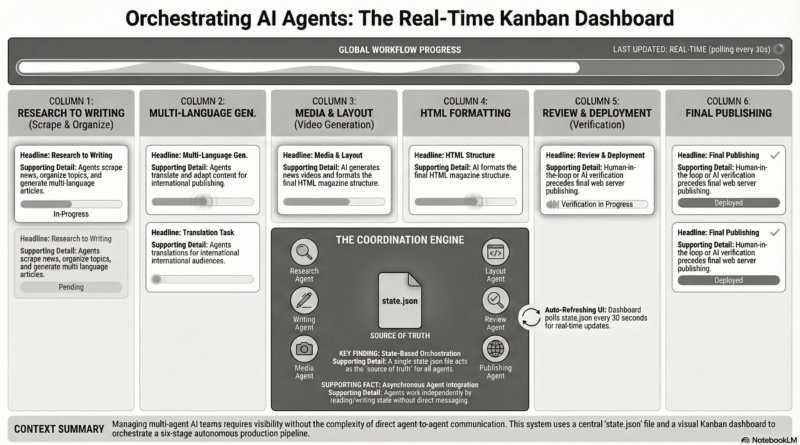
Managing multi-agent AI workflows requires coordination, tracking, and real-time visibility. In this guide, I’ll show you how we built a visual Kanban dashboard that orchestrates autonomous magazine production using AI agent teams.
The Problem
We have a daily magazine production process involving 6 stages:
- Research – Scrape news, organize topics, find images
- Write Articles – Create content in multiple languages
- Video Production – Generate news videos with AI
- Magazine Layout – Format HTML magazine structure
- Quality Review – Verify accuracy and functionality
- Publish – Deploy to web server
Each stage has different AI agents running tasks independently. We needed a way to monitor progress in real-time without manual coordination.
The Solution: State-Based Kanban Dashboard
Our approach uses a simple but powerful architecture:
- State File: A JSON file that tracks workflow status
- Kanban UI: Real-time visual dashboard
- Auto-Refresh: Updates every 30 seconds
- Agent Coordination: Agents read/write state without direct communication
Architecture Overview
1. State Management (state.json)
The heart of the system is a state.json file that captures the entire workflow status:
{
  "date": "2026-03-23",
  "lastUpdated": "2026-03-23T12:00:00Z",
  "today": {
    "articleCount": 12
  },
  "workflow": {
    "research": {
      "status": "done",
      "notes": "Scraped 15 articles, found 8 images"
    },
    "write": {
      "status": "in-progress",
      "notes": "Writing Tech News section..."
    },
    "video": {
      "status": "pending"
    },
    "layout": {
      "status": "pending"
    },
    "review": {
      "status": "pending"
    },
    "publish": {
      "status": "pending"
    }
  }
}
Key Design Decisions:
- Simple Structure: Human-readable JSON that’s easy to debug
- Stage-Based: Each workflow stage has independent status
- Notes Field: Allows agents to communicate context without direct messaging
- Timestamps: Track when stages were last updated
Building the Kanban Dashboard
HTML Structure
The dashboard uses a clean grid layout with 3 main sections:
- Header: Shows date, progress bar, last update time
- Kanban Board: 6 columns (one per workflow stage)
- Summary Stats: Tasks completed, in progress, articles created
JavaScript – Stage Configuration
We define each stage’s tasks in a configuration object:
const STAGE_CONFIG = {
  research: {
    num: '01',
    title: 'Research',
    agent: 'Content Researcher',
    tasks: [
      { name: 'Scrape news from multiple sources', key: 'scrape' },
      { name: 'Organize by topics', key: 'organize' },
      { name: 'Find special sections', key: 'special' },
      { name: 'Locate featured images', key: 'images' },
      { name: 'Save to /shared/articles-raw/', key: 'save' }
    ]
  },
  write: {
    num: '02',
    title: 'Write Articles',
    agent: 'Content Writer',
    tasks: [
      { name: 'Write World News (ZH)', key: 'world-zh' },
      { name: 'Write World News (EN)', key: 'world-en' },
      { name: 'Write Tech News (ZH)', key: 'tech-zh' },
      { name: 'Write Tech News (EN)', key: 'tech-en' },
      { name: 'Write Culture section', key: 'culture' },
      { name: 'Write History Today', key: 'history' },
      { name: 'Write Poetry section', key: 'poetry' },
      { name: 'Write sections (Joke, Recipe, Art)', key: 'sections' },
      { name: 'Save to /shared/articles-draft/', key: 'save' }
    ]
  },
  // ... more stages
};
State Loading with Cache Busting
The dashboard loads state.json with a timestamp query to prevent browser caching:
async function loadState() {
  try {
    const response = await fetch('state.json?' + new Date().getTime());
    const state = await response.json();
    return state;
  } catch (error) {
    console.error('Failed to load state:', error);
    return null;
  }
}
Task Calculation Logic
We infer task completion based on stage status:
function calculateStageTasks(state, stageId, stageData) {
  const tasks = STAGE_CONFIG[stageId].tasks;

  if (stageData.status === 'done') {
    // All tasks complete
    return tasks.map(task => ({ ...task, completed: true }));
  }

  if (stageData.status === 'in-progress') {
    // Estimate 50% complete
    return tasks.map((task, idx) => ({
      ...task,
      completed: idx < Math.floor(tasks.length / 2)
    }));
  }

  // No tasks started
  return tasks.map(task => ({ ...task, completed: false }));
}
Kanban Rendering
Dynamic HTML generation for each column:
function renderKanban(state) {
  const board = document.getElementById('kanban');
  board.innerHTML = '';

  Object.entries(state.workflow).forEach(([stageId, stageData]) => {
    const config = STAGE_CONFIG[stageId];
    const tasks = calculateStageTasks(state, stageId, stageData);
    const completedTasks = tasks.filter(t => t.completed).length;
    const progress = Math.round((completedTasks / tasks.length) * 100);

    const statusLabel = stageData.status === 'done' ? 'Done'
      : stageData.status === 'in-progress' ? 'In Progress'
      : 'Pending';

    const statusClass = stageData.status === 'done' ? 'status-done'
      : stageData.status === 'in-progress' ? 'status-in-progress'
      : 'status-pending';

    // Generate column HTML...
  });
}
Auto-Refresh Mechanism
Set up periodic polling to automatically update:
async function refresh() {
  const state = await loadState();
  if (state) {
    renderKanban(state);
    updateStats(state);
  }
}

// Refresh every 30 seconds
refresh();
setInterval(refresh, 30000);
Styling – Monochrome Design
We use a clean black/white/gray color scheme for professional appearance:
body {
  background: linear-gradient(135deg, #2d2d2d 0%, #1a1a1a 100%);
  font-family: 'Noto Sans SC', sans-serif;
}

.header {
  background: #1a1a1a;
  border-bottom: 3px solid #000;
  border-radius: 2px;
}

.kanban-column {
  background: #ffffff;
  box-shadow: 0 20px 60px rgba(0,0,0,0.4);
  border: 1px solid #e0e0e0;
}

.status-done {
  background: #000;
  color: #fff;
}

.status-in-progress {
  background: #999;
  color: #fff;
  animation: pulse 2s infinite;
}

.status-pending {
  background: #ccc;
  color: #666;
}
Interactive Features:
- Hover Effects: Task cards show details on hover
- Progress Animation: Smooth transitions for progress bars
- Stage Pulse: In-progress stages pulse to draw attention
- Responsive Design: Adapts to mobile screens
Agent Integration
How Agents Update State
Each agent reads and writes to state.json without needing direct coordination:
# Agent pseudocode
def run_stage(stage_id):
  # 1. Load current state
  with open('state.json', 'r') as f:
    state = json.load(f)

  # 2. Mark stage as in-progress
  state['workflow'][stage_id]['status'] = 'in-progress'
  state['workflow'][stage_id]['notes'] = f"Started at {datetime.now()}"
  state['lastUpdated'] = datetime.now().isoformat()

  # 3. Save state immediately
  with open('state.json', 'w') as f:
    json.dump(state, f, indent=2)

  # 4. Run actual tasks
  results = execute_tasks()

  # 5. Mark stage as done
  state['workflow'][stage_id]['status'] = 'done'
  state['workflow'][stage_id]['notes'] = f"Completed {len(results)} items"
  state['lastUpdated'] = datetime.now().isoformat()

  # 6. Save final state
  with open('state.json', 'w') as f:
    json.dump(state, f, indent=2)
Key Benefits:
- No Direct Communication: Agents work asynchronously
- Fault Tolerant: If one agent fails, others continue
- Visual Coordination: Dashboard shows what’s happening
- Parallel Execution: Multiple stages can run simultaneously
Deployment
File Structure:
/daily-magazine/
├── team-dashboard/
│   ├── kanban-styled.html      # Main dashboard
│   ├── state.json               # Workflow state (auto-generated)
│   ├── index.html               # Detailed view
│   └── wbs-styled.html          # Work breakdown structure
├── /shared/
│   ├── articles-raw/            # Research output
│   ├── articles-draft/          # Draft articles
│   ├── videos-final/            # Completed videos
│   └── magazine/                # Final magazines
└── /agents/
    ├── researcher.py
    ├── writer.py
    ├── video_producer.py
    └── orchestrator.py
Web Server Integration:
Serve the dashboard via static file server:
# Simple nginx configuration
server {
    listen 8000;
    root /var/www/daily-magazine/team-dashboard;

    location / {
        index kanban-styled.html;
        autoindex on;
    }
}
Advanced Features
1. Quick Actions Navigation
Add action buttons for common tasks:
<div class="action-buttons">
  <a href="index.html" class="action-btn">Detailed Dashboard</a>
  <a href="../magazine/2026-03-23.html" class="action-btn">View Final Magazine</a>
  <a href="../images/news.mp4" class="action-btn">Watch Video</a>
</div>
2. Progress Visualization
Calculate overall progress from task completion:
function updateStats(state) {
  const stages = Object.values(state.workflow);

  // Count completed tasks across all stages
  let completedTasks = 0;
  let totalTasks = 0;

  Object.entries(state.workflow).forEach(([stageId, stageData]) => {
    const tasks = calculateStageTasks(state, stageId, stageData);
    completedTasks += tasks.filter(t => t.completed).length;
    totalTasks += tasks.length;
  });

  const progress = Math.round((completedTasks / totalTasks) * 100);

  document.getElementById('progress-fill').style.width = `${progress}%`;
  document.getElementById('progress-fill').textContent = `${progress}%`;
}
3. Responsive Design
Adapt layout for mobile screens:
@media (max-width: 768px) {
  .kanban-board {
    grid-template-columns: 1fr; /* Single column on mobile */
  }

  .header h1 {
    font-size: 32px;
  }

  .summary-stats {
    grid-template-columns: 1fr 1fr;
  }
}
Best Practices
1. State File Management
- Atomic Writes: Write entire state in one operation (avoid partial updates)
- JSON Validation: Validate state.json structure before use
- Backup Strategy: Create timestamped backups before major changes
2. Dashboard Optimizations
- Cache Busting: Add timestamp to fetch URLs to force updates
- Debounce Updates: Limit frequency if state changes rapidly
- Error Handling: Graceful fallback if state file is missing/corrupt
3. Agent Coordination
- Stage Dependencies: Use status to enforce workflow order
- Timeout Handling: Set timeouts for each agent operation
- Retry Logic: Automatic retry for transient failures
Real-World Results
Since implementing this Kanban dashboard:
- Visibility: Real-time view of entire production pipeline
- Transparency: Clear indication of bottlenecks and issues
- Coordination: Agents work autonomously without manual intervention
- Accountability: Each stage has clear ownership and notes
The dashboard has transformed our magazine production from a black box into a transparent, observable workflow. Agents run independently while the dashboard provides the coordination layer that makes multi-agent teamwork possible.
Conclusion
Building a real-time Kanban dashboard for AI agent teams doesn’t require complex orchestration frameworks. With simple state management, clean visualization, and auto-refresh capabilities, you can create powerful coordination systems that make autonomous agent collaboration practical and observable.
The key principles are:
- Simple state representation (JSON is perfect)
- Clear stage boundaries with defined tasks
- Real-time updates via polling or websockets
- Visual feedback through intuitive Kanban interface
- Agent autonomy – coordinate through state, not direct messaging
Start small, iterate on the design, and watch your AI agents work together in harmony!
demo kanban board