
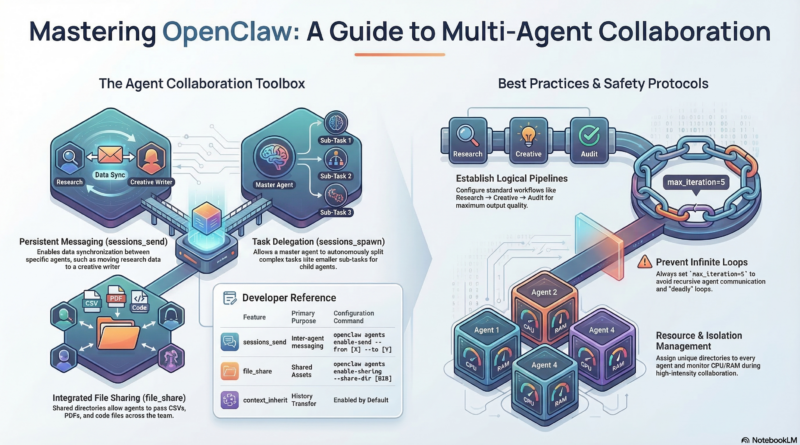
OpenClaw 智能体自动协作配置指南
一、核心协作工具对比
| 通信工具 | 用途 | 适用场景 | 配置命令 |
|---|---|---|---|
| sessions_send | 持久Agent间消息传递 | 研究→写作的数据同步 | openclaw agents enable-send --from research --to creative |
| sessions_spawn | 派生子Agent执行任务 | 主Agent拆分复杂任务 | 默认启用,无需配置 |
| file_share | 跨Agent共享文件 | 传递CSV/PDF/代码文件 | openclaw agents enable-sharing --share-dir ~/shared |
| context_inherit | 子Agent继承上下文 | 临时任务需历史信息 | 默认启用 |
二、配置团队协作工作流
1. 创建共享工作区
bash
# 创建共享目录,让Agent可以交换文件
mkdir -p ~/.openclaw/shared/{inbox,outbox,archive}

# 设置权限
chmod -R 755 ~/.openclaw/shared
2. 配置Agent协作关系
方案A:研究→创作→审核流水线
bash
# 1. 配置研究助手自动发送结果给创意写手
openclaw agents configure research \
  --auto-send-to creative \
  --auto-send-condition "on_task_complete" \
  --output-format "markdown"

# 2. 配置创意写手自动请求推理专家审核
openclaw agents configure creative \
  --auto-request-review reasoning \
  --review-condition "on_content_created" \
  --review-threshold "quality_score>0.8"
方案B:代码开发协作流水线
bash
# 1. 配置编程专家完成代码后自动触发审查
openclaw agents configure coding \
  --on-complete-trigger "reasoning:review_code" \
  --trigger-params "code_path,test_results"

# 2. 配置推理专家审查后自动反馈
openclaw agents configure reasoning \
  --on-review-complete "send_to:coding" \
  --review-output "review_report.md"
3. 使用工作流模板
bash
# 创建协作工作流配置文件
cat > ~/.openclaw/workflows/team-collab.yaml << 'EOF'
version: "2.0"
workflows:
  - name: "research_to_content"
    trigger:
      type: "cron"
      schedule: "0 9 * * *"  # 每天9点自动触发
    steps:
      - agent: "research"
        task: "收集今日AI领域热点"
        output: "daily_news.md"
        share_with: ["creative"]

      - agent: "creative"
        task: "基于daily_news.md创作3篇社交媒体文案"
        input: "/shared/inbox/daily_news.md"
        output: "/shared/outbox/social_posts/"
        notify: true

      - agent: "reasoning"
        task: "评估文案质量并给出优化建议"
        input: "/shared/outbox/social_posts/"
        condition: "creative.task_complete"
        review_mode: "strict"

  - name: "code_review_pipeline"
    trigger:
      type: "webhook"
      path: "/webhook/github/push"
    steps:
      - agent: "coding"
        task: "分析代码变更并运行测试"
        auto_review: true

      - agent: "reasoning"
        task: "架构审查和性能评估"
        depends_on: ["coding.test_pass"]
        review_depth: "deep"

      - agent: "main"
        task: "汇总审查结果并生成报告"
        final_step: true
EOF
三、启用Agent间直接通信
根据GitHub官方项目,OpenClaw支持agentToAgent直接通信:
bash
# 1. 配置Agent Teams模式 openclaw config set team_mode=true openclaw config set team_lead="main" openclaw config set team_members="coding,research,creative,reasoning" # 2. 启用对抗性协作(Adversarial Collaboration) cat > ~/.openclaw/workspace/AGENTS.md << 'EOF'协作模式配置
创意与批判对抗
- ideator: creative # 创意生成 - critic: reasoning # 批判审查 - 规则: 每个创意必须经过批判,评分≥18/20才通过写作与审查对抗
- writer: creative # 内容创作 - reviewer: research # 事实核查 - 规则: 内容必须通过reviewer的事实核查才能发布自主认领机制
- 共享任务列表位于: /shared/tasks/ - 成员可自主认领任务 - 任务状态: pending → in_progress → review → done EOF
四、配置心跳主动协作
bash
# 配置HEARTBEAT.md cat > ~/.openclaw/workspace/HEARTBEAT.md << 'EOF' # 主动协作任务每30分钟
- research: 检查科技新闻,如有重大更新→发送给creative - coding: 检查代码仓库,如有新PR→请求reasoning审查每日08:00
- research: 生成《今日研究简报》 - 自动发送给: creative, coding, reasoning - 存档至: /shared/archive/daily_brief/条件触发
- 当research发现"重要突破"关键词 → 立即通知creative创作内容 - 当coding构建失败 → 自动通知reasoning分析原因 - 当creative完成10篇内容 → 触发reasoning批量质量评估 EOF # 启用心跳 openclaw config set heartbeat_interval=300 # 5分钟检查一次 openclaw agents enable-heartbeat --all
五、在Telegram群组中协作
bash
# 1. 将所有Agent加入同一个Telegram群组
openclaw agents bind --all --channel telegram --group-id "你的群组ID"

# 2. 配置@提及规则
openclaw config set require_mention=true  # 需要@才回复,避免群聊混乱

# 3. 设置话题隔离(每个项目独立话题)
openclaw agents configure coding --topic-mode=per_project
openclaw agents configure creative --topic-mode=per_project
六、完整示例:自动文章创作流水线
bash
# 步骤1:研究助手收集资料
openclaw agents send research \
  --to creative \
  --message "刚收集到AI行业最新报告,请查收" \
  --attach "/shared/research/ai_report.md"

# 步骤2:创意写手自动创作
openclaw agents configure creative \
  --on-file-received "/shared/research/*.md" \
  --auto-process "根据报告创作3篇博客文章大纲" \
  --output-dir "/shared/outlines/"

# 步骤3:推理专家自动评估
openclaw agents configure reasoning \
  --watch-dir "/shared/outlines/" \
  --on-new-file "评估大纲质量和创新性" \
  --score-threshold 8 \
  --pass-to "creative:refine" \
  --fail-to "research:more_data"

# 步骤4:主控汇总
openclaw agents configure main \
  --watch-all true \
  --summary-daily true \
  --report-to "telegram:每日创作报告"
七、验证协作状态
bash
# 查看所有协作连接
openclaw agents list --connections

# 查看协作日志
openclaw agents logs --follow --collab-only

# 测试协作流程
openclaw agents test-collab --workflow research_to_content

# 查看协作统计
openclaw agents stats --collab-metrics