
在多个OpenClaw网关之间共享OneAPI代理LLM
Introduction
Running OpenClaw on multiple machines doesn’t mean you need separate LLM subscriptions for each one. By sharing a single OneAPI proxy between your VPS and local MacBook, you can centralize your AI model access while maintaining the flexibility of distributed gateways. This setup not only saves costs but also simplifies management and provides consistent model behavior across all your environments.
In this guide, we’ll walk through configuring two OpenClaw gateways—one on a remote VPS and one on your local MacBook—to share the same OneAPI proxy for LLM access. Whether you’re developing locally and deploying remotely, or simply want to optimize your infrastructure, this approach gives you the best of both worlds.
Why Share a OneAPI Proxy?
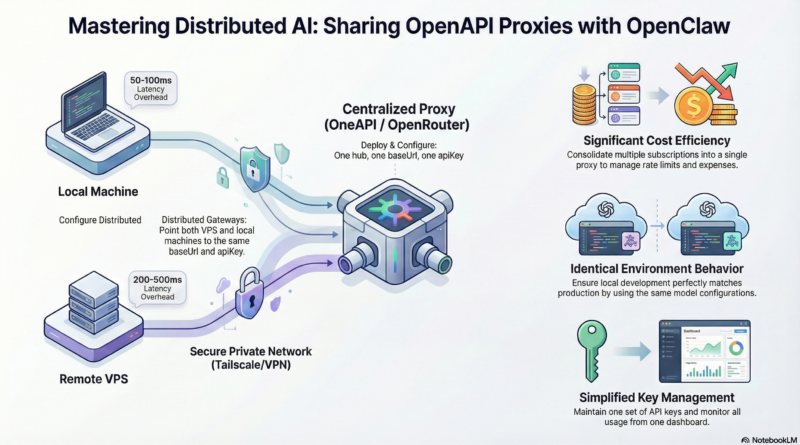
Cost Efficiency: Instead of paying for multiple API subscriptions or running separate model instances, you consolidate everything into a single proxy. This is especially valuable when using paid LLM services or when you have rate limits to manage.
Consistent Behavior: Both gateways access the same models with identical configurations. This means your local development environment matches your production environment exactly—no surprises when you deploy.
Simplified Management: One set of API keys, one configuration to maintain, and one place to monitor usage and costs. Updates and changes propagate automatically to all connected gateways.
Load Balancing: Some OneAPI proxies support load balancing across multiple model providers or instances, giving you better performance and reliability without additional complexity on each gateway.
Architecture Overview
The setup consists of three main components:
- **OneAPI Proxy Server:** A centralized service that handles LLM API requests. This can be a self-hosted solution like OneAPI or a cloud-based proxy service.
- **VPS OpenClaw Gateway:** Your remote production or development environment running OpenClaw, configured to use the shared proxy.
- **Local MacBook OpenClaw Gateway:** Your local development environment, also configured to use the same proxy.
Both OpenClaw gateways make requests to the same OneAPI proxy endpoint, which then forwards them to the underlying LLM providers. The proxy handles authentication, rate limiting, and any additional processing you need.
Setting Up the OneAPI Proxy
Option 1: Self-Hosted OneAPI
OneAPI is a popular open-source solution for managing multiple LLM providers through a single interface. Here’s how to set it up:
# Clone the repository
git clone https://github.com/songquanpeng/one-api.git
cd one-api

# Configure your providers (edit data/config.json)
# Add your API keys for OpenAI, Anthropic, etc.

# Start the server
docker-compose up -d
OneAPI provides a web interface for managing your API keys, monitoring usage, and configuring routing rules. It supports multiple providers including OpenAI, Anthropic, Google, and various Chinese LLM services.
Option 2: Cloud-Based Proxy Services
If you prefer a managed solution, services like OpenRouter, Together AI, or custom API gateways can serve as your proxy. These services typically offer:
- Unified API endpoints
- Built-in load balancing
- Usage analytics
- Automatic failover
Choose the option that best fits your needs and technical comfort level.
Configuring OpenClaw Gateways
VPS Gateway Configuration
On your VPS, edit the OpenClaw configuration file:
# /root/.openclaw/config.yaml
llm:
  provider: openapi
  openapi:
    baseUrl: "https://your-proxy.example.com/v1"
    apiKey: "your-proxy-api-key"
    model: "gpt-4"  # or your preferred model
    timeout: 30000
Restart the gateway to apply changes:
openclaw gateway restart
Local MacBook Gateway Configuration
On your local machine, use the same configuration:
# ~/.openclaw/config.yaml
llm:
  provider: openapi
  openapi:
    baseUrl: "https://your-proxy.example.com/v1"
    apiKey: "your-proxy-api-key"
    model: "gpt-4"
    timeout: 30000
Restart your local gateway:
openclaw gateway restart
Important: Both gateways should use the same baseUrl and apiKey to ensure they’re accessing the same proxy instance.
Testing the Setup
Verify that both gateways can successfully access the LLM through the shared proxy:
# On VPS
openclaw status

# On local MacBook
openclaw status
Both should show successful connections to the OneAPI proxy. You can also test by sending a simple message through each gateway and confirming responses are received.
Advanced Configuration
Model Routing
Configure your OneAPI proxy to route different requests to different models based on criteria like:
- Request complexity
- User or session ID
- Time of day
- Cost thresholds
This allows you to optimize costs by using cheaper models for simple tasks and premium models for complex ones.
Rate Limiting
Implement rate limiting at the proxy level to prevent abuse and manage costs effectively:
# OneAPI example configuration
rate_limits:
  per_minute: 100
  per_hour: 1000
  per_day: 10000
Monitoring and Logging
Set up monitoring to track usage across both gateways:
- Request volume per gateway
- Response times
- Error rates
- Cost tracking
Most OneAPI proxies provide built-in dashboards or can integrate with monitoring tools like Prometheus and Grafana.
Security Considerations
API Key Management: Store your proxy API keys securely. Use environment variables or secret management tools rather than hardcoding them in configuration files.
Network Security: If your proxy is self-hosted, ensure it’s behind a firewall and uses HTTPS. Consider using a VPN or Tailscale for private network access.
Access Control: Implement authentication at the proxy level to prevent unauthorized access. Each gateway should have its own credentials if possible.
Audit Logging: Enable logging on the proxy to track which gateway is making which requests. This helps with debugging and security auditing.
Troubleshooting
Gateway Can’t Connect to Proxy:
- Verify the proxy URL is correct and accessible
- Check firewall rules on both the proxy and gateway
- Ensure the API key is valid and has sufficient permissions
Inconsistent Behavior Between Gateways:
- Confirm both gateways are using identical configuration
- Check for cached responses or local configuration overrides
- Verify the proxy isn’t applying different rules based on source IP
Rate Limiting Issues:
- Review your proxy’s rate limit settings
- Consider implementing request queuing or retry logic
- Monitor usage patterns to identify bottlenecks
Conclusion
Sharing a OneAPI proxy between multiple OpenClaw gateways is a powerful pattern for distributed AI infrastructure. It reduces costs, simplifies management, and ensures consistent behavior across all your environments.
Whether you’re running a production VPS and a local development machine, or managing multiple deployment environments, this approach gives you the flexibility you need without the complexity of managing separate LLM setups.
Start with a basic configuration, test thoroughly, and then expand with advanced features like model routing and monitoring as your needs grow. Your future self will thank you for the streamlined, cost-effective setup.