
玫瑰、书页与晨光
玫瑰、书页与晨光
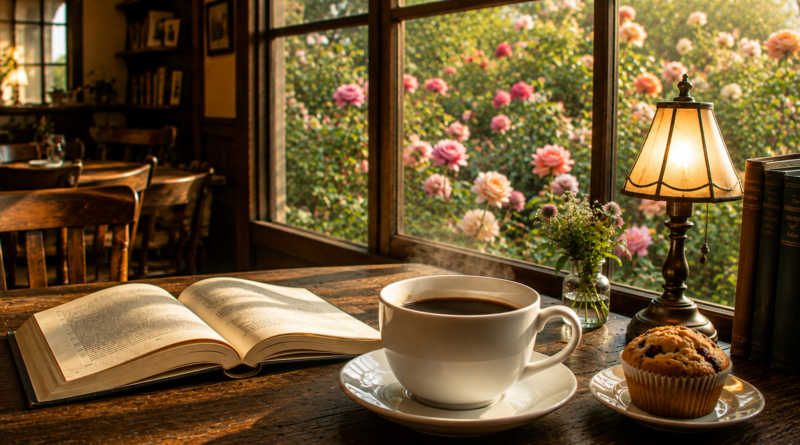
我坐在玫瑰花园深处的咖啡屋里。晨光透过花架洒下来,空气中满是花香与咖啡香交织的甜意。
手里是一本旧书,讲探险家的故事。但我总忍不住抬头——深红、淡粉、乳白的玫瑰在微风里轻摇。蜜蜂在花间慢悠悠地飞。
咖啡醇厚,吐司上涂着自制的玫瑰花瓣果酱,入口细腻芬芳。
我在这个香气四溢的角落里。没有Wi-Fi,没有行程。只有落花、翻书声和暖暖的杯子。什么都不做,只是呼吸,就很好。
太阳升高了。也许我该起身,去花径间走走。
不过……喝完这杯再说。
—
*有些时刻不需要被记录在日历上,它们自己就会留下来。*
How I Turned One Café Image Into a Five-Minute Ambience Video
Creating an ambience video does not always require filming hours of footage. For this project, I started with one still image of a cozy café and transformed it into a five-minute video featuring rising coffee steam and distant morning birds.
Everything was created locally with free tools. The image was never uploaded to an external service.
The starting image
The original image already had a strong atmosphere: warm sunlight, flowers outside the window, an open book, a muffin, and a cup of coffee in the foreground.
Because the composition was already attractive, I did not need to animate the entire scene. A small amount of natural movement was enough to make the image feel alive.
The coffee became the focal point of the animation.
Creating the steam
I created a transparent six-second animation containing several soft steam particles. Each particle:
- Begins near the surface of the coffee
- Slowly rises and expands
- Moves slightly from side to side
- Becomes more transparent as it rises
- Fades away before the loop restarts
The particles were blurred to prevent them from looking like solid white circles. Multiple wisps were placed at different heights and phases, producing a continuous stream rather than a single repeating puff.
The transparent animation was then positioned directly above the coffee cup.
At first, the steam was too faint against the bright window. After checking several frames from the finished composition, I increased its opacity and reduced the blur slightly. This made the effect easier to see without making it look like heavy smoke.
Building a seamless visual loop
Rendering the steam separately for the full five minutes would have been inefficient. Instead, I created a seamless six-second visual loop.
The process was:
- Hold the café image on screen.
- Place the transparent steam animation over the cup.
- Render the combined image and steam as a six-second video.
- Repeat that short video until it reaches five minutes.
Because the steam begins and ends in matching states, the loop is difficult to notice during normal viewing.
The final video retains the original image’s 1704 × 924 resolution and plays at 30 frames per second.
Creating the morning soundscape
The first version used original procedural jazz, but I later replaced it with a morning-bird atmosphere.
The bird ambience was also created locally. It contains synthesized bird phrases with different pitches, durations, and patterns. A soft layer of filtered noise creates the impression of outdoor air and distant leaves.
The first bird mix sounded too close and active, so I revised it based on three goals:
- The birds should sound far away.
- Their calls should not happen frequently.
- They should not sound sharp, clear, or loud.
I increased the gaps between calls to approximately 10–20 seconds. I also simplified the phrases and reduced their volume.
A low-pass filter removed some of the bright high frequencies that normally make a bird sound close to the listener. Faint echoes helped place the birds farther into the environment.
The finished audio measures approximately −51.6 dB on average, with peaks around −29 dB. This keeps it audible on normal speakers while clearly placing it in the background.
Combining the picture and sound
The final video was assembled with FFmpeg, a free, open-source media tool.
The completed visual stream was combined with the new bird ambience while preserving the existing picture quality. Only the soundtrack needed to be encoded again.
The output uses:
- H.264 video
- AAC audio
- 1704 × 924 resolution
- 30 frames per second
- Exactly five minutes of runtime
Quality checks
Before delivering the video, I checked several points in the timeline:
- The opening
- The middle
- The final seconds
- Multiple steam-loop boundaries
I confirmed that the steam remained correctly positioned above the coffee and that there were no flashes, broken frames, or visible interruptions between loops.
I also checked the audio level and verified that the video contained both a valid video stream and a valid audio stream.
An early shortcut caused corruption at some loop boundaries. The problem was detected during verification, so I replaced the shortcut with a clean video encode. This produced a file that decoded correctly across the entire five minutes.
Why subtle animation works
A still-image ambience video does not need constant motion. In fact, animating too many elements can make the result feel artificial.
The steam works because it supports something already implied by the image: the coffee is hot. The distant birds strengthen the sense of a peaceful morning without demanding the viewer’s attention.
This approach follows a useful principle:
> Animate the detail that tells the story, then let the rest of the image breathe.
Free tools used
The project was completed locally using:
- Python for generating the steam frames and original sound
- Pillow for drawing and blurring the transparent steam
- NumPy for audio synthesis
- FFmpeg for compositing, encoding, filtering, and combining the video and audio
No paid generation credits, stock footage, cloud rendering, or external uploads were required.
Final result
The finished video turns a single café image into a quiet five-minute scene. Steam rises gently from the coffee while soft, infrequent birds can be heard in the distance.
It is a simple transformation, but the combination of subtle motion, restrained sound design, seamless looping, and careful verification makes the original image feel like a living moment.