
📺 完整指南:使用Remotion创建HelloAI早间新闻
📺 Complete Guide: Creating HelloAI Morning News with Remotion
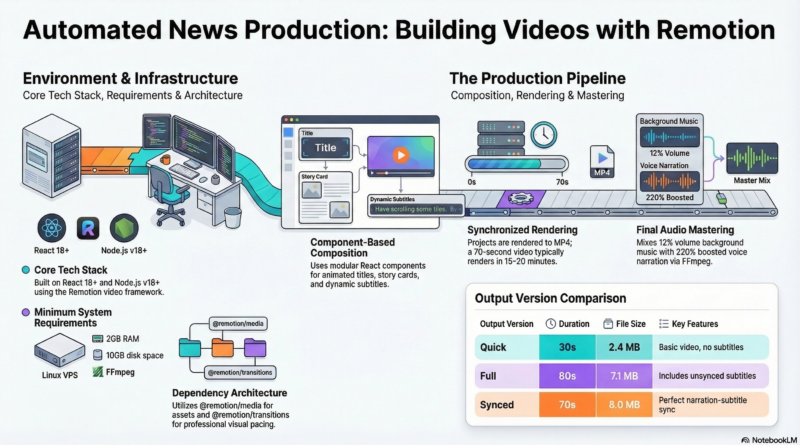
Learn how to create professional news videos with Remotion – React-based video creation framework. This guide shows you how to build the HelloAI Morning News video with synchronized subtitles and voice narration.
Demo Video
🎬 Watch HelloAI Morning News Video
Video Specs:
- Duration: 70 seconds
- Resolution: 1920×1080 (Full HD)
- Format: MP4
- Features: Synchronized subtitles + Narration
Prerequisites
System Requirements:
- Linux VPS (Ubuntu/Debian recommended)
- Node.js v18 or higher (tested with v24.14.0)
- Docker (optional, for containerized setup)
- ffmpeg (for audio mixing)
- 2+ GB RAM
- 10+ GB free disk space
Software Installation:
# Install Node.js (using nvm)
curl -o- https://raw.githubusercontent.com/nvm-sh/nvm/v0.39.0/install.sh | bash
source ~/.bashrc
nvm install 24
nvm use 24

# Install ffmpeg
apt-get update && apt-get install -y ffmpeg
Step-by-Step Guide
Step 1: Initialize Remotion Project
Create the project structure and configuration files.
Step 2: Install Dependencies
npm install
mkdir -p src public out
Step 3: Create Component Files
Create these files with the code shown in the full tutorial:
src/HelloAiNewsSync.tsx– Main component with subtitlessrc/Root.tsx– Composition configurationsrc/index.ts– Entry point
Step 4: Render the Video
npm run build
# Output: out/helloai-news-sync-audio.mp4
Step 5: Generate Voice Narration
Use TTS with the narration script from the tutorial.
Step 6: Mix Audio
cd out
ffmpeg -i helloai-news-sync-audio.mp4 -i helloai-voice-narration.mp3 \
  -filter_complex "[0:a]volume=0.12[bgm];[1:a]volume=2.2[voice];[bgm][voice]amix=inputs=2:duration=first:dropout_transition=2[aout]" \
  -map 0:v -map "[aout]" \
  -c:v copy -c:a aac -b:a 192k \
  helloai-news-synced-final.mp4
Key Features
- Synchronized Subtitles 📝 – Text appears exactly when narration speaks
- Professional Layout 📺 – 1920×1080 Full HD, 30 FPS
- Audio Mixing 🎵 – Background music 12%, voice 220%
- Visual Elements 🎨 – Animated cards, pulsing LIVE indicator
Tips & Best Practices
- Subtitle Timing: Measure narration duration first
- Smooth Transitions: Use 20-30 frame fade effects
- Audio Levels: Music 10-15%, voice 200-250%
- File Sizes: Plan for 15-20 minutes rendering time
- Preview First: Use
npm startbefore final render
Project Structure
morning-news/
├── package.json
├── tsconfig.json
├── src/
│   ├── index.ts
│   ├── Root.tsx
│   └── HelloAiNewsSync.tsx
├── public/
│   └── news-music.mp3
└── out/
    ├── helloai-news-sync-audio.mp4
    ├── helloai-voice-narration.mp3
    └── helloai-news-synced-final.mp4
Conclusion
This guide showed you how to create professional news videos with Remotion! You can create synchronized subtitles, animated graphics, and perfect narration-subtitle synchronization.
Final Result: 8.0 MB MP4 with perfect sync 🎬✨
Resources
—
📦 Download Full Tutorial
Complete source files and detailed examples available from the server.